You can automatically assign a role on your Discord server using your rewards. This option works when creating a new reward or modifying an existing one.
At the bottom of the configuration pop-up of your reward, you will find a button "Associate a Discord role".
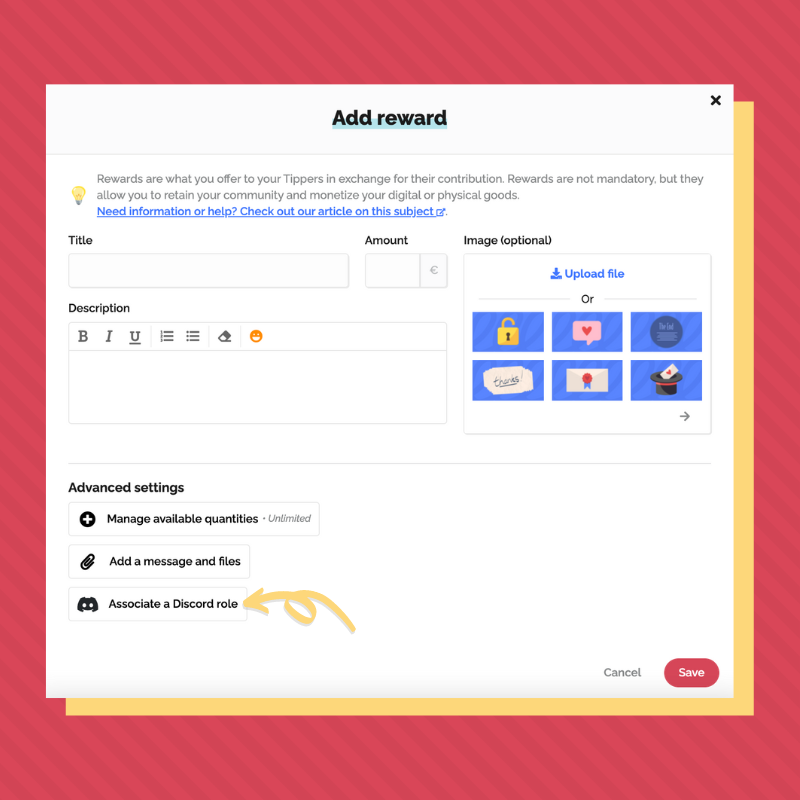
Link your Discord server to install the Tipeee bot. Then, go to Discord and place the Tipeee bot on top of the roles covered by your rewards. The Tipeee bot is offline on your server, that's normal 😉
Finally, for each reward on Tipeee, choose the relevant role. If you can't find the role you want, click on "Reload the roles".
Once a Tipper has taken this reward, the role is automatically assigned the next time he/she logs on to Discord (to do so, he/she must link his/her Discord account to his/her Tipeee account). Each role can either be permanently assigned or assigned and then revoked at the end of the Tip.